accessUSA Book a phoneBook

A real U.S. iPhone, controlled from your browser.

We host physical iPhones in Houston, Texas, each on its own U.S. mobile plan. You watch the screen live and tap, swipe and type from anywhere in the world.

Already own an iPhone, or buying elsewhere? Talk to us on Telegram before you order or ship. We confirm the model and delivery details first.

  • Your own iPhone, hosted for $30 a month
  • Or rent one of ours for $50, when one is available
  • No commitment; catalog purchases paid through Stripe
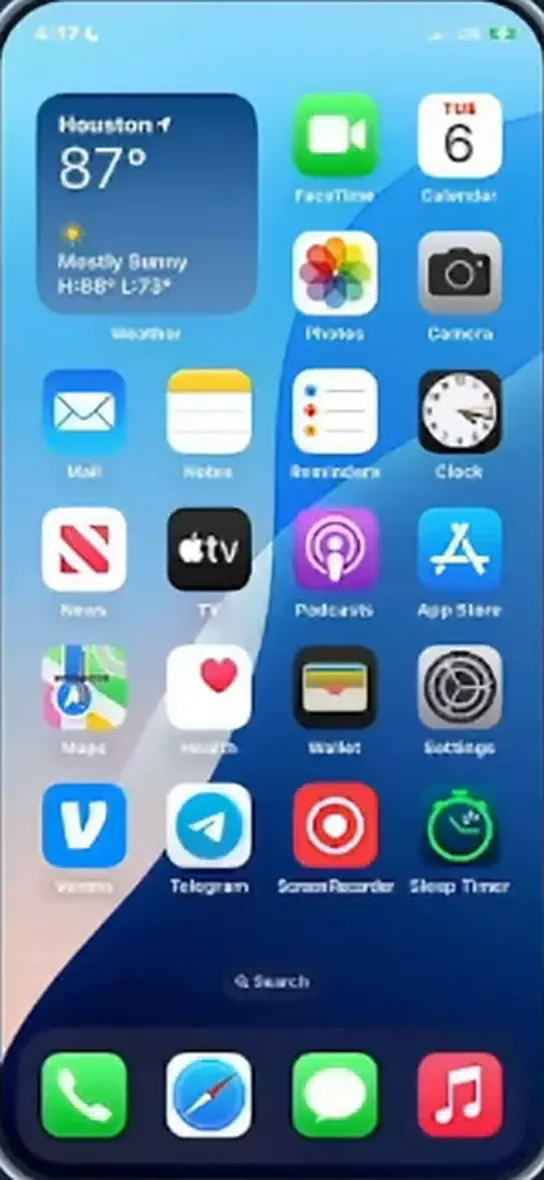
Viewing iPhone XR in Houston, TX

Remote control

Try the controls from our software.

Quick actions

You are watching. One person controls at a time: press Take control.

Try it. This is a preview of the controls in our software, with screens from our demo iPhone XR. Watch the demo

Not an emulator. Not a proxy. A phone.

The device, the mobile line and the place are all real. Our software carries the screen to your browser, and your taps back to the phone.

Houston, Texas: where your phone is hosted.
The phone
A physical iPhone. Buy one through us, send one you already own or buy elsewhere, or rent one of ours when one is available.
The line
Its own U.S. mobile plan. The phone goes online over cellular data, with no proxy and no Wi-Fi. Your computer can use any connection.
The place
Our location in Houston, Texas. We physically move the phones every week; it is part of the service.
The controls
Our own software, built in-house. You see the screen live and tap, swipe, rotate and type. Invite the people you choose: one person controls, the others watch.

From choice to first tap.

Choose a model in our catalog, arrange delivery of your own iPhone, or check rental availability with our Phone Manager.

  1. Choose your phone

    Compare new iPhones from the Apple Store and refurbished ones from Back Market, with their prices in U.S. dollars. You can also send an iPhone you own or buy elsewhere, or check our rentals in Houston.

    See the options
  2. Arrange your phone

    For a catalog purchase, sign in to our app, add the phone to your cart, review the costs and pay on Stripe. For a rental, contact the Phone Manager to confirm availability. Sending your own? Confirm the model and delivery details with us on Telegram first.

  3. Use it from your browser

    The phone appears in your workspace as soon as it is online. See its screen and control it from anywhere.

Your phone and your accounts stay yours.

You are trusting us with a device and with the accounts you run on it. These are the rules we work by.

accessUSA is a service of RippleLabs LLC, Houston, Texas.

  • Only you and the people you invite use the phone.

    You decide who has access. One person controls at a time while the others watch.

  • We access your phone in three cases only.

    To set it up, to fix a connection problem, or when you ask us to.

  • We never ask for your account passwords.

    You sign in to your apps yourself, on the phone’s screen.

  • A phone you buy is yours.

    We host it for you. It remains your property.

  • No commitment.

    Hosting and rental are billed monthly. Stop from your account at any time; it takes effect at the end of the period you have paid for.

  • Your card details go to Stripe, not to us.

    You pay on Stripe’s checkout page. We never see or store your card number.

  • Written terms, and your own copy.

    You accept the terms of use of each phone in your account, and you can download your copy at any time.

  • A company you can name.

    RippleLabs LLC is the name you will see on Stripe’s checkout page and on your card statement.

Watch one in use.

An iPhone XR in Houston, its live screen in our software, and Instagram opened from a browser.

Recorded with an earlier version of our interface. The demo iPhone XR runs on LTE.

Work that needs a real iPhone.

For work that needs a physical iOS device, wherever your team is.

Test on real iOS. Check app behavior, mobile websites and user journeys on an actual iPhone.

Work as a team. Share a phone with the people you choose. Everyone sees the same screen, and control passes from one person to the next.

Keep your work moving. Use your apps and manage day-to-day tasks on a dedicated U.S. phone, from wherever you are.

Priced per phone, per month.

In U.S. dollars. No commitment.

Your own iPhone, hosted in Houston

$30per phone / month, for hosting

Buy a new or refurbished iPhone through our catalog, have one bought elsewhere delivered to us, or ship an iPhone you already own with UPS or FedEx. We confirm the model and delivery details on Telegram before you order or ship. The phone stays yours.

The first 30 days of hosting are free, counted from the day your phone is online, not while it is being delivered.

Either way, the U.S. mobile plan is paid separately. We choose it and set it up with you. We recommend Mint Mobile; another compatible carrier works too.

Compare the three options

New

Optional: let Claude work the phone.

Add our MCP connector to Claude and it can do on the phone what you do in our software: see the screen, tap, type, open apps, publish a post. We set it up with you on Telegram.

Claude is a product of Anthropic. accessUSA is not affiliated with Anthropic.

You, in Claude
Open Instagram and publish the latest photo in the camera roll with this caption: “New week, new drop.”

Your phone in HoustonThe task happens on the real phone. You can watch its screen in our software.

Illustration with an example request.

Before you book.

What people ask us most.

Is it a real iPhone?

Yes. You get remote access to a physical iPhone in Houston, not an emulator or a virtual phone.

Where are the phones?

In Houston, Texas. You use them from your browser, wherever you are.

Who can see or use my phone?

You, and the people you invite. One person controls at a time while the others watch its screen. We access a phone in three cases only: to set it up, to fix a connection problem, or when you ask us to.

Do you need my passwords?

No. You sign in to your apps yourself, on the phone’s screen. We never ask for the passwords of your accounts.

Is the phone included in the monthly price?

If you rent one of ours, yes: $50 per month covers the phone and its hosting. For your own iPhone, bought through us or sent by you, hosting is $30 per month after its first 30 days online. The mobile plan is paid separately in both cases.

How do I book a phone?

For a catalog purchase, choose a new or refurbished model, then continue in the app to sign in or create your account. Add it to your cart, review the costs and pay by card on Stripe. Follow its preparation in your dashboard. For a rental, contact our Phone Manager to confirm availability. To send your own iPhone or buy elsewhere, contact us on Telegram first to confirm the model and delivery details.

Can I rent a phone right now?

Only when one is available in Houston. The availability page shows the current stock. To rent one, contact our Phone Manager on Telegram (opens Telegram). Viewing the catalog does not reserve a phone.

How do I follow a phone I bought?

In your dashboard. Each phone shows its own step: payment received, ordered, received in Houston, ready. Your 30 free days of hosting start when it is online.

Can I stop when I want?

Yes. There is no commitment. You stop from the Billing page of your account, and it takes effect at the end of the period you have paid for.

What name will be on my card statement?

RIPPLELABS LLC. accessUSA is a service of RippleLabs LLC, Houston, Texas. It is also the seller name shown on Stripe’s checkout page.

Can more than one person use a phone?

Yes. You share access with the people you choose. One person controls the phone at a time while the others watch its screen.

Can I talk to someone first?

Yes. Message us on Telegram at @Rafaelzrk (opens Telegram). Existing clients sign in at app.accessusa.tech.

Start with one phone.

Add more when you need them.

One phone today. Up to 15 per client.